
In this guide
An LG washer showing uE, UE, or Ub is reporting a balance problem, not automatically a failed sensor. The useful question is whether the code follows one awkward load or appears during a controlled Rinse+Spin test. Lowercase uE often means the washer is still trying to redistribute; uppercase UE means it could not finish that correction.
Read uE and UE as two moments in the same attempt
| Display or behavior | What it tells you | Best next check |
|---|---|---|
| uE appears and the cycle adds water or tumbles | The washer is attempting to rebalance | Wait for that attempt unless vibration becomes severe |
| UE or Ub remains | Automatic redistribution did not succeed | Pause and redistribute manually |
| Only one blanket, pillow, or mat triggers it | Weight is concentrated on one side | Use the approved cycle or remove the unsuitable item |
| Every normal load triggers UE | Level, floor, installation, or suspension needs attention | Perform a controlled Rinse+Spin test |
Build a load the drum can balance
One bath mat, pillow, or small load can be harder to balance than several similar items. Untangle sheets, do not wrap garments around the agitator or impeller, and avoid mixing one water-heavy piece with light synthetics. LG advises checking both too-small and too-large loads. For front loaders, a drum around two-thirds full is a useful model-specific reference, but always follow the capacity and cycle instructions for your washer.
Do not add random dry towels to a saturated waterproof item. Some mats, electric blankets, rubber-backed pieces, and stuffed products may not be machine washable. Check the care label. For related drain symptoms, use the LG OE drain guide; slow draining can leave clothes too wet and make balance recovery harder.
Check level without opening the cabinet
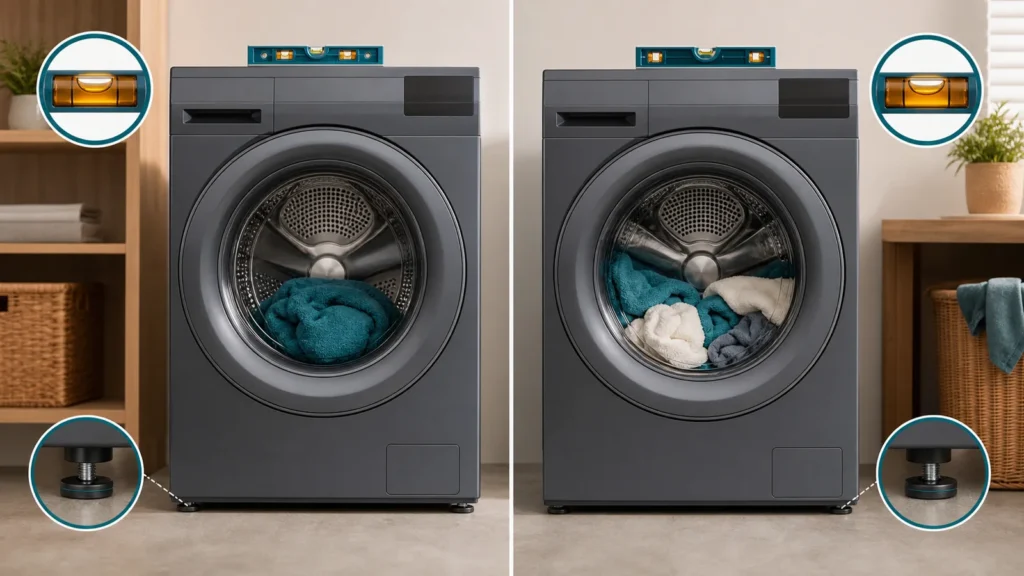
With the washer off and empty, press each top corner. The cabinet should not rock. Use a bubble level front-to-back and side-to-side, then adjust only the feet described in the owner manual and tighten their lock nuts. A flexible or slippery floor can let a correctly leveled washer move. Confirm that shipping bolts were removed on a newly installed front loader; do not run another spin if they remain.
| Controlled test | Result | Interpretation |
|---|---|---|
| Empty Rinse+Spin | Quiet acceleration and full spin | Load type and distribution are more likely |
| Balanced towels on Rinse+Spin | Completes normally | Original item or cycle was the trigger |
| Empty drum bangs or cabinet walks | Unsafe repeated test | Stop and request installation/mechanical inspection |
| Drum sits visibly off-center | Level or suspension concern | Photograph the position and contact service |
When UE is not a DIY balancing problem
Stop if the drum rubs, there is metal impact, water leaks, the cabinet moves despite level feet, or UE returns with an empty controlled test. Do not open the cabinet or bypass vibration protection. Record a short video from a safe distance, the load type, chosen cycle, spin speed, and whether the washer drains fully. The LG dE door-lock guide and LG LE motor-lock guide cover different codes and should not be mixed with UE.
Use the repeat pattern to avoid unnecessary parts
Keep a three-cycle note rather than repeatedly opening and rearranging the same load. Record item type, approximate drum fill, selected cycle, spin speed, when uE first appeared, and whether the washer added water before UE. A code limited to one blanket is different from UE on towels, clothes, and an empty test. If reducing spin speed completes the cycle, that is useful evidence, not proof that a sensor is bad.
Do not calibrate, reset, or enter service mode from an unrelated video. Calibration procedures differ by chassis and do not correct a rocking cabinet or unsuitable item. If the machine was recently moved, confirm shipping hardware and drain-hose routing with the installation guide. If it has gradually become noisier, photograph the feet and floor and ask service to inspect suspension and installation before ordering a control board.
Drain or balance? If water remains in the drum before UE appears, complete the washer 5C/5E drain-path checks first; a wet load can mask the real spin result.
Sources and review
We checked LG’s current guidance for top-load uE/UE/Ub, its front-load UE procedure, and the official guide for clothes left too wet. Cycle names and allowable items vary by model.